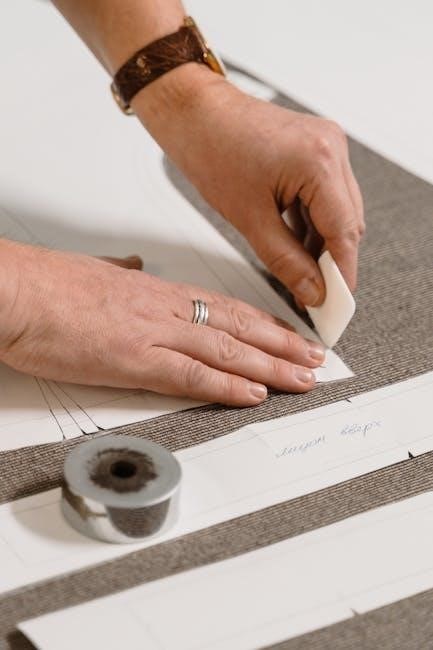
Understanding Tiled PDF Sewing Patterns
Tiled patterns offer a convenient solution for home sewers, allowing printing on standard 8.5 x 11 inch paper. These patterns are split into multiple sections, or tiles, for easy assembly.
What are Tiled Patterns?
Tiled PDF sewing patterns are designed to be printed on standard-sized paper, typically 8.5 x 11 inches, using a home printer. Unlike traditional large-format patterns, these are broken down into numerous individual “tiles” or sections. This fragmentation allows anyone with a regular printer to create full-sized patterns without specialized equipment.
Each tile contains a portion of the overall pattern pieces. These tiles often include alignment marks – squares, numbers, and letters – to facilitate accurate reassembly. The process involves printing each tile, then carefully taping or gluing them together to recreate the complete pattern layout. This method is particularly useful for complex designs or patterns that would otherwise be too large to print at home.
Why Use Tiled Patterns?
Tiled patterns democratize pattern access, eliminating the need for expensive large-format printers or trips to fabric stores for printed patterns. They offer significant cost savings and convenience, allowing immediate download and printing at home. This is especially beneficial for sewists with limited storage space, as digital files take up minimal room.
Furthermore, tiled patterns are ideal for those who prefer to test fit or make alterations before cutting into expensive fabric. The ability to easily reprint individual tiles is a major advantage. They also cater to a wider range of pattern designers, enabling them to offer intricate designs without the logistical challenges of large-scale printing and shipping.
Preparing to Print
Before printing, ensure your printer is ready and calibrated for accurate results. Checking settings and performing a test print are crucial steps for success.
Printer Settings for Accurate Printing
Achieving accurate prints is paramount when working with tiled PDF sewing patterns. Begin by accessing your printer settings and verifying the “Scale” option is set to “Actual Size” or 100%. Avoid options like “Fit to Page,” as this will distort the pattern’s dimensions.
Select high-quality print settings for sharper lines and clearer markings. Paper type selection is also important; choose a setting appropriate for the paper you’re using (standard, matte, or photo paper). Disable any background printing options to conserve ink.
Crucially, ensure you are printing from a reliable PDF viewer that doesn’t automatically alter the document’s scale. Preview the first page before printing the entire file to confirm the test square (often 1cm or 1 inch) prints correctly.
Checking Your Print Scale
Before committing to printing the entire pattern, meticulously check your print scale using the included test square. Most tiled patterns feature a 1cm or 1-inch square clearly marked on each tile. After printing a sample tile, carefully measure this square with a ruler.
If the square measures precisely 1cm or 1 inch, your printer is set correctly. However, if there’s a discrepancy, revisit your printer settings and adjust the scaling until accurate measurements are achieved. Consistent accuracy across all tiles is vital for a properly fitting garment.
Remember to only adjust scaling if necessary; a slight deviation can significantly impact the final product. Rows and columns often have guiding squares and letters to aid alignment and scale verification during assembly.
Paper Types Suitable for Sewing Patterns
When printing tiled PDF sewing patterns, the choice of paper significantly impacts ease of assembly and pattern durability. Standard 20lb or 24lb printer paper is commonly used and perfectly adequate for initial pattern creation and tracing.
However, for patterns intended for repeated use, consider heavier weight paper like 32lb or even cardstock. This provides increased sturdiness and resistance to tearing during tracing and cutting. Lightweight paper can become fragile with handling, especially after taping or gluing.
Avoid glossy or coated papers, as they can be difficult to write on and may not adhere well to tape or glue. Matte paper offers the best balance of print quality and usability for sewing patterns.
Printing the PDF
Successfully printing requires selecting the “Actual Size” option to ensure accurate scaling. Large files may need to be printed in sections, tile by tile.
Selecting the Correct Print Option (Actual Size)
Crucially, when printing your tiled PDF sewing pattern, avoid options like “Fit to Page” or “Scale to Fit.” These settings will distort the pattern pieces, leading to inaccurate garment sizing. Instead, always select the “Actual Size” or “100%” scaling option within your printer settings.
This ensures that the printed tiles maintain the original dimensions designed by the pattern maker. Before printing the entire file, it’s wise to print just one tile as a test. Verify that the 1cm and 1-inch squares, often included on the tiles, print at the correct size using a ruler. If the test tile is accurate, proceed with printing the complete pattern, confident in its dimensional accuracy.
Dealing with Large Pattern Files
Large PDF sewing pattern files, especially those with many tiles – like the 66-part example – can be challenging for both your computer and printer. To manage these files, consider printing in sections rather than attempting to print the entire document at once. This reduces the strain on your system’s memory and processing power.

Furthermore, some PDF viewers offer options to print specific page ranges. Utilize this feature to print rows or columns of tiles sequentially. If you encounter issues, explore using a dedicated PDF printing utility, which may offer more robust handling of complex files. Remember to always verify scale after printing a test tile, even with segmented printing.
Troubleshooting Common Printing Issues
Incorrect printing scale is a frequent problem with tiled PDFs. Always print a test square – often 4×4 inches or 10×10 cm – and verify its dimensions before printing the entire pattern. If the scale is off, adjust your printer settings accordingly. Another common issue is incomplete printing, where parts of the tiles are cut off. Check your margin settings and ensure they aren’t interfering with the pattern content.
Faded or light prints can be resolved by selecting a higher print quality setting. Finally, banding or streaking may indicate a need to clean your printer heads. Regularly maintaining your printer will ensure accurate and clear pattern prints.
Assembling the Printed Pattern
Carefully align the tiles using registration marks – squares or numbers/letters – and securely fasten them together with tape or glue for accurate use.
Using Registration Marks for Alignment
Registration marks are crucial for accurately assembling a tiled PDF sewing pattern. These typically appear as small squares, often 1cm or 1 inch, printed on each tile. Their purpose is to ensure precise alignment when taping or gluing the pattern pieces together.
Many patterns utilize a grid system with rows labeled by numbers and columns by letters, further aiding alignment. Begin by carefully trimming the edges of each row to create straight lines. Stacking rows for trimming can significantly speed up the process.
When joining tiles, meticulously match the registration marks. This guarantees that pattern lines connect correctly, preventing distortion in the final garment. Consistent checking of these marks throughout assembly is vital for a successful outcome.
Taping vs. Gluing Pattern Pieces
When assembling a tiled PDF sewing pattern, you face a choice: taping or gluing the tiles together. Both methods have advantages. Taping, often with sellotape, is reversible, allowing for corrections if misalignment occurs during assembly. It’s a quicker initial process, especially when assembling numerous rows before joining them.
However, gluing creates a more permanent and robust pattern. It’s ideal for patterns you anticipate using frequently. Ensure you use a glue that won’t warp the paper. Consider the long-term storage implications; taped patterns can become fragile over time.
Regardless of your choice, work on a flat, clean surface. Overlap the edges slightly and ensure a smooth, secure bond for accurate pattern pieces.
Working with Multiple Rows and Columns
Assembling patterns with numerous rows and columns requires a systematic approach. Begin by trimming each row to remove uneven edges, streamlining the process. Stacking rows for simultaneous trimming significantly speeds up assembly. Once trimmed, tape or glue each row together, setting them aside until all rows are complete.
Many patterns incorporate alignment aids like numbered rows and lettered columns, alongside centimeter and inch squares for scale verification. Utilize these features diligently to ensure accurate alignment. Finally, carefully join the completed rows, referencing the layplan provided with the pattern.
Patience is key; a well-assembled pattern ensures accurate garment construction.
Software Tools for Pattern Assembly
PDF Stitcher, an open-source program, excels at reassembling tiled patterns digitally, avoiding tedious manual work. Image editing software like Photoshop or GIMP can also be utilized.
PDF Stitcher: An Open-Source Solution
PDF Stitcher presents a fantastic, free option for digitally reassembling those numerous tiled pattern pieces. Specifically designed for this purpose, it streamlines the process significantly, bypassing the often-laborious task of copy-pasting within programs like Photoshop. This open-source software intelligently aligns and merges the individual PDF tiles, creating a single, cohesive pattern sheet.

Users benefit from its user-friendly interface and automated alignment features, reducing the potential for errors. It’s particularly helpful when dealing with patterns split into a large number of parts – like the example of a 66-part pattern mentioned. The software is available at pdfstitcher.org, offering a readily accessible solution for anyone seeking to simplify their pattern assembly workflow. It’s a valuable tool for efficient pattern preparation.
Image Editing Software (Photoshop, GIMP)
While PDF Stitcher offers a dedicated solution, image editing software like Adobe Photoshop or the free alternative, GIMP, can also be employed to reassemble tiled patterns. This method involves importing each PDF tile as a separate layer within the software. Precise alignment is crucial, utilizing the registration marks – squares, letters, and numbers – present on the pattern tiles.
This approach allows for manual adjustments and fine-tuning, offering greater control over the final assembled image. However, it can be more time-consuming, especially with patterns containing a high number of tiles. Careful attention to scale and resolution is essential to maintain pattern accuracy. Though potentially tedious, it provides a flexible option for those familiar with image editing techniques.
Pattern Layout and Usage
Once assembled, understand the pattern layout sheet to efficiently arrange pieces, minimizing paper waste. Trace carefully, adding seam allowance as needed for accurate garment construction.
Understanding Pattern Layout Sheets
Pattern layout sheets are crucial for efficient fabric use when sewing. These sheets illustrate how to position all the pattern pieces onto your chosen fabric, maximizing material and minimizing waste. They often show different layout options based on fabric width and nap direction.
Before cutting, carefully study the layout sheet. Pay attention to grainlines, indicated by arrows, which must align with the fabric’s lengthwise grain for proper drape and garment structure. The layout will also indicate which pieces require folding the fabric, and any specific placement considerations.
Remember to arrange your pattern pieces over the tiles in a way that minimizes the amount of paper needed when re-printing, as suggested for optimal resourcefulness.
Tracing Pattern Pieces
Once your tiled pattern is assembled, tracing the desired size is the next step. Instead of cutting directly into the printed tiles – preserving them for future use – use tracing paper, parchment paper, or pattern tracing fabric. A spiked-tracing wheel is highly recommended for efficiently transferring the pattern outlines.
Carefully trace each pattern piece, ensuring accuracy along all lines. If your handmade patterns already include seam allowance, mark the actual sewing line during tracing. Otherwise, remember to add seam allowance to the traced tiles after completing the outline.
Consider drawing a test square (4×4 or 10cm x 10cm) on one of the tiles to verify scale before tracing all pieces, ensuring accurate garment construction.
Adding Seam Allowance
After tracing your pattern pieces, adding seam allowance is crucial for accurate garment construction. Many PDF patterns are drafted without a pre-defined seam allowance, giving you flexibility. A standard seam allowance is typically 5/8 inch (1.5cm), but check your pattern instructions for specific recommendations.
Using a ruler and marking tool, carefully measure and mark the desired seam allowance around each traced pattern piece. Ensure consistent measurements for a professional finish. For curved edges, use a hip curve ruler to create smooth, accurate lines.
If you’re using tracing paper, you can directly draw the seam allowance onto the paper. If using tracing fabric, consider using a washable fabric marker for easy removal if needed.
Long-Term Pattern Storage
Protect assembled patterns from damage by storing them flat or rolled. Back up the original PDF digitally to avoid re-printing and potential loss.
Protecting Assembled Patterns
Once meticulously taped or glued together, your assembled pattern deserves careful preservation. Consider storing the finished pattern flat, ideally between two large sheets of acid-free paper or cardboard. This prevents creasing and tearing over time. Alternatively, gently roll the pattern, securing it with a ribbon or elastic band – avoid tight rolling which can damage the joins.
Protecting it from moisture is crucial; a dry, dark storage space is best. Avoid attics or basements prone to dampness. Clear plastic sleeves or large zip-lock bags can offer an extra layer of defense against dust and accidental spills. Remember, a well-preserved pattern saves you the effort of re-printing and re-assembling in the future, ensuring your favorite designs are always ready when inspiration strikes!
Digital Backup of Original PDF
Beyond the physical pattern, safeguarding the original PDF file is paramount. Store a copy on multiple devices – your computer, an external hard drive, and a cloud storage service (like Google Drive or Dropbox) – to prevent data loss. Consider creating a dedicated folder for all your purchased or created sewing patterns, organized by designer or project.
Regularly verify the integrity of your digital backups to ensure they are accessible. This simple step protects your investment and avoids the frustration of needing to repurchase a pattern. Having the original PDF allows for easy re-printing if your assembled pattern becomes damaged, or if you need different sizes in the future. It’s a small effort with significant long-term benefits!
Leave a Reply
You must be logged in to post a comment.